Showing posts with label Mudboxing. Show all posts

Wednesday, 7 August 2013

Hard Surface Attempt Mk III

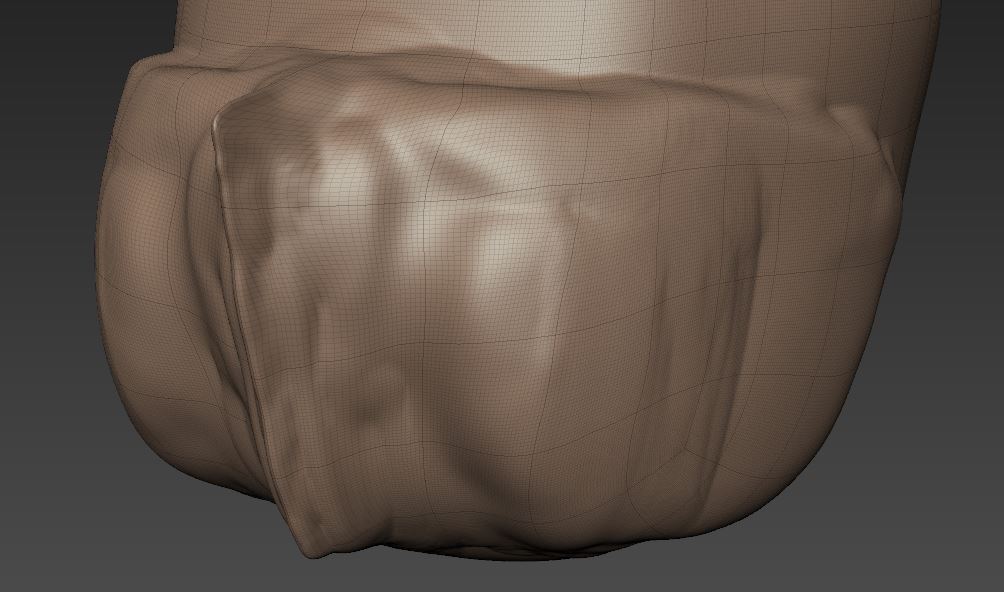
 Beginning to make sense of it all I think, I just took the time this morning to do something simple like a medieval helmet. just 3 flat sides meeting at a point.

Before flattening
I mostly just used the bulge and wax tools to build up the geometry after defining the point with the sculpt tool, and then used the other 2 tools to build up the rest of the geometry to meet it. Finally I used the pinch tool to define the edges a little bit more. Worked rather well.

After flattening
However at the end of the day, all I have are 3 flat face which should be a poly each and only take seconds to make within 3DS Max, as opposed to the 2 hours it took me to do this..

Tuesday, 6 August 2013

+5 Anatomy Knowledge

Well it was my birthday not too long ago and i got myself a how to draw anatomy book, and it has really helped.

Granted the result of sculpting with it open (seen below) isn't totes amaze balls but I'm still quite happy with it and it is a huge improvement.


Hard Surface Attempt Mk II

Once again I attempted some hard surface sculpting within mudbox with my resolve renewed. Totally could've gone better but hey. I tried and learnt some new tricks too.

This.. thing, for lack of a batter word was meant to be a big robot looking creature with smooth metal panels and massive air intakes on the chest there. That is no what they turned out to be. I watched a video whilst working on this and you can see how it was meant to turn out.


Front
 I suppose I have improved somewhat but I am still determined to nail down hard surface modeling, some day. However I am starting to consider zbrush more and more now especially after watching the intro video to a new eat3D tutorial video that uses, guess what? zbrush and it does seem to have some very useful tools.

Back

Maybe next time I'll get something nailed down right..

Monday, 5 August 2013

Hard Surface Attempt

I absolutely love modeling with mudbox compared to 3ds Max, you just get so much more freedom in what you are doing. However it is very difficult to get hard edged shapes down and from what I can gather it is also rather difficult to do hard surface modelling within mudbox with zbrush suppossedly being the better program for such things.

An example of a hard surface model
However I do not have £400 odd lying around so I will make do with mudbox, not to mention mudbox's UI is so much simpler and I'm already very familiar with it so I might as well stick with it.

To begin with I made myself a little torso and head just so I could do a little practice on some armour or something.
 
 
I was also following this little youtube video series although a lot of it was presented in a, "here's something I did earlier" kinda way which wasn't very insightful, but nevertheless I tried my hand.


The result wasn't the best, though you can sorta see something coming through. Maybe with practice, or maybe with zbrush I'll actually create something very hard edged.


Friday, 5 July 2013

Mudboxing - Keepin' Face!

The mudboxing continues, this time I tried my hand at a head and just went from there, it didn't turn out the best.


I initially started with a sphere, shaped it into a head and thought I'd mark out where the eyes nose and mouth would go, although I quickly realised I didn't have the geometry I needed to make the nose without subdividing it loads.

So I began again, only this time with the base head from mudbox and worked from there, those results weren't the best either. So once again I found myself heading over to youtube to find some tutorials.

I didn't find a tutorial as such but rather a guy going through his process of mudboxing a face and explaining the anatomy behind the face such as bones and muscles and how they shape the face which I found to be a great help.

Eyes = Winging it                                                                       Nose down = Tutorial

Ears are quite hard


The final head looked ok I thought, with the exception of the weirdly high up eyes and thought that I had done a good enough job with the muscles and bones etc. However after leaving it for an hour and coming back to it I think I should've exaggerated the features a little bit more, especially if the head was part of a much larger body.


After going back and lowering the eyes however the head did look a good bit better. Although wow those ears look horrific!  Still good practice I guess.

Mudboxing - T Rex

Been doing some mudboxing, just followed a tutorial series up on YouTube which was very good in getting the hang of the basics and it goes over all the sculpting tools, creating vector displacement maps, and painting.

The eyes turned out way more emotional than I had planned, hence the silly caption
I find mudbox to be hugely fun to work with, much more enjoyable than modeling withing 3DS Max, although you definitely have a lot more control within 3DS Max, and (correct me if I'm wrong) but you can't create new geometry, and so mudbox really does seem to be a tool for creating extra detail to an already made model. Although, I'd be very happy to work solely in mudbox if it was possible, it's very quick and very fun.

Again after painting the eyes still did not look very fierce
 The painting with mudbox is also very good, it has the main functions found within photoshop such as layers, masking, brush size and opacity changes. Reminded me a lot of painting my old 40k models back in the day.

difference between not using normal maps and using normal maps


Pose tools in mudbox are quite easy to use which is nice, although better poses can be achieved with a skeleton

The tutorial series then ended with a look at the pose tool, which can be quickly used to pose whatever it is you just created, it works very well and it's quite easy to use. Although rigging a mesh with a skeleton can get you much much greater results.